Edibz - The Geek's Organisation !

Find Out your latest Application, News, how to, Android, Iphone, geek news, Gaming and all devices latest updates

Responsive Ads Here
Showing posts with label How to. Show all posts

Saturday, 10 March 2018

How to protect SnapeChat pictures with Password

With Memories, you can save Snapshot photos without publishing them.
These snaps are uploaded to the company's servers to remain saved even if your phone is lost.

The problem with these images is that they are not password protected and if you give your phone to a friend to see some pictures he will be able to access all the other pictures!
Fortunately, Snap Chat offers a great feature called My Eyes Only, a new section where you can save images and protect your own password.
How so?

In the beginning, we open the Snape Chat app and then press the button below to enter the Memories section


We then select the images that we want to protect with a secret number and press on it to show us the following options: My Eyes Only:


The following screen appears. We choose Quick Setup:


We choose the secret code we want (if we want a more difficult code, we choose Use Passphrase below):


The number we chose appears, we agree to the condition shown below (the condition is that you can not recover your password if you forget it):


By doing this we have completed the necessary settings! Click Finish:


The MY EYES ONLY section is created and accessible by accessing the Memories and then heading to the last window on the right:


To finally show us the pictures we saved there!


Tuesday, 6 March 2018

Tips to avoid things that drain your phone battery

We know you've read dozens of articles and watched many videos with tips to help you extend your iPhone's battery life and not drain it quickly. 


These articles and advice will not end. They are constantly repeated especially when each new version. Based on recent studies, five main reasons have been found to damage and drain the battery faster and how to prevent it.


1 - Hot or cold weather


The use of iPhone in hot weather or cold weather has a detrimental effect on battery performance and age. It is known that room temperature ranges from 20 to 25 degrees Celsius. It is the best temperature to use the phone and charge the battery as well as storage, but of course getting the perfect temperature is always impossible, so always prefer your phone temperature between 5 degrees Celsius to 45 degrees Celsius, and any temperature otherwise is very harmful to the phone battery Or on the phone as a whole. Yes iPhone has a fire feature if the temperature exceeds a certain limit, but the shutdown of the operating system aims to reduce the internal heat but damage to the battery continues.

What do I do to avoid this:

◉ Store and charge iPhone as much as possible at room temperature.
◉ Put your phone in your pocket for as long as possible if the weather is cold.
◉ Remove your phone from any covers in hot weather.
◉ Do not put your phone in the car if it is hot, and do not expose it directly to the sun.

2 - Poor network coverage


Add to that the weak Wi-Fi network. The poor coverage has a significant impact on battery depletion and life span, because the iPhone is working hard and continuously provide a better signal.

To avoid this, we recommend the following:

◉ If you are in an area with a weak signal, connect your phone to the charger, or activate flight mode.

3- Lot of Notifs


This is not a common problem but indirectly causes depletion of energy. Imagine with me that hundreds of notifications come to you and each time the phone screen lights up for the notification to appear. This will consume a huge amount of energy without being unknowable. On the top of the destructive applications of the battery applications social networking, every pressure I like or comment will be notified by this not only harms the battery, but the same person and his time where it is permanently fragmented.

If you have such apps and the large number of notifications, disable them in Settings - Notifications - then search for the app you want and then disable "Show on lock screen" or cancel notification at all.

4 - Screen brightness 


5 - Applications that drain the battery


This may cause by damage or depletion of your phone battery. It is an application installed on your computer that has a software code with defects that have a clear effect on the battery drain and destruction. And it happened with Facebook and the company recognized this - see this link - and repeated with YouTube months ago, which caused the drain of the battery dramatically even if the application is not used until the problem was addressed later.

Tips to avoid such situations :

If you find your battery performing quickly and suddenly getting worse, go to Settings - Battery - then look at which applications consume more power.
If you click the clock next to the last 24 hours tab and the Last two days tab, the amount of time spent on the screen and in the background will be displayed so you can see which applications consume more power in the background, Renew applications in the background if you want.


How to rotate inverted Videos

Often you record a video but it happens to be turned upside down at a certain angle ... you may overlay it or you see it as I imagine you know


But there is no need for this problem from now on so that it is very simple and easy you only need to download this app


A way to encrypt and avoid eavesdropping on Android phones?


Digital technology experts have warned of the emergence of a new eavesdropping virus that is attacking Android Smartphones.

"RedDrop", secretly records everything that happens near Android smartphones, and then empties the contents of voice recording in the file exchange program.

The virus can also use the smartphone to access paid websites, via the phone owner's account, and install new malicious applications.

RedDrop has been found in more than 50 international applications commonly used, such as the calculator, paint, some games and educational programs apps.

"RedDrop", linked to mobile Android devices, and there is no protection mechanism against him to this day, and to avoid this virus, experts advise to download applications from authorized stores only.

[post_ad]


Thursday, 22 February 2018

How to disable slow iPhone performance in iOS 11.3

   By the end of 2017, Apple has admitted to deliberately slowing down iPhone phones. In an attempt to apologize to its customers, the company has launched a program to replace old iPhone batteries for $ 29, which will continue until the end of 2018. The company also added a new feature called Battery Health In the iOS 11.3 beta, which will slow down the iPhone's performance.


Battery Health can be accessed through Settings> Battery. This new feature will tell you important information about your iPhone's battery: the first about the maximum capacity and the second about the battery's ability to withstand the high performance of your phone Peak Performance Capability. Before you can disable the slow down mechanism for your phone, you need to first determine if your phone is slowing down or not. If you really have a slow problem, go to the Battery Health option and in the Maximum Capacity section you'll see your battery health rate. If the battery is less than 80% healthy, it means that your phone is slowing down, but if it's higher, your phone is in the right position and is capable of working at peak performance.


If the battery capacity is less than 80%, you'll see a message that your device's battery has 
deteriorated and that performance management features have been enabled. These features are what reduce the speed of your machine. You'll find the message in the Peak Performance Capability section and include a "Disable" or "Disable" link below. If you press it, it will disable slow down performance. You should be aware that you will not be able to reactivate this feature again. If your phone turns off unexpectedly after you disable it, iOS 11 will automatically turn it on again. Outside of this scenario, the user will not be able to control re-enabling this feature. Note that if you disable the phone, do not expect your phone to work as fast as it did on the first day. It will run a little faster than it was before disabling the feature but will not return to its speed when it is new.

Thursday, 25 January 2018

How to play Ps2 games on Ps3

The best easy way to play PS2 games on PS3


After downloading, unzip it and it will appear to you like this :


Now place all those files inside the Usb or HardDisk formated in fat32

Connect the USB or HardDisk to your device

(1): Open the INSTAL PKG FILE and select PS2 ISO LAUNCHER 1.30

It will appear in your device as follows :


and also Reactpsn in the same path 


Now create a new user in your device and rename it aa

[post_ad]

Now go to the user called aa and go to the program Reactpsn and enter it

After that, you will start to see the exdata program that was placed inside the USB beforehand

Then you will notice that the user AA has changed it name to Ractpsn and this is evidence of the success of the process


Do not forget to choose the user you play from it and do not enter again to the user who turned his name into Ractpsn

Now before choosing the game enter the PS2 ISO LAUNCHER Simulator and it is necessary to enter it

Before choosing any game to function without problems you will see the Playstation 2 logo

Then exit the emulator

Now enter Multiman and go to the path of Retro and choose the game after clicking on the emulator


Note :

For those who do not know how to enter PS2 games in Ps3, follow me

1. Create a PS2ISO folder and place PS2 games inside it

2. Put the Ps2ISO folder in its content inside the Hard32 Fat32 and attach it to your device

3. Open the multiman and go to the RETRO path and then enter the harddisk as USB Device

Then go down to the PLAYATATION2 selection where you will find the game or games click on any game and the device will start

By following it you will be transferred to the XMB. Enter the PS2 ISO LAUNCHER emulator

Important Notes

(1): After choosing the game Ps2 from the path RETRO will show you the game disc do not enter it

Because once you enter it will freeze the device so you must run the game by emulator PS2 ISO LAUNCHER

(2): If the game size is larger than 4GB, it must be transferred via FTP to a track

dev-hdd0-> PS2ISO will show you in the RETRO path

(3): was exceeded in this version of the problem of extinguishing the hand control after running Ps2 games and having to deliver the cable with

Machine, and now once the game is run just press the Ps button and the control hand will work without problems


Thursday, 30 November 2017

4 tools to create, convert and edit PDF files

The PDF format is a must exchange document. It is an essential format but can sometimes be complicated to manage if you do not have the right tools. To help you save time and control the management of your PDF files here is a selection of free and paid tools that adapt to all uses. These tools will be particularly useful if you want to create, modify, convert or compress your PDFs.

PDFelement 6


PDFelement 6 allows you to simply create a PDF file on which you can add text, images or links. It is possible to create a PDF from a Word, Excel or PowerPoint file by simply opening it and saving it as a PDF. You can also create "form" files: files that your contacts can fill. A very practical feature, and that is particularly useful.


Ilovepdf


ilovepdf.com is a free online service that lets you compress and convert your PDF files. Less complete than PDFelement, it has the advantage of being usable without downloading. It mainly offers conversion functions from PDF to PowerPoint, Excel, JPG and vice versa.


PDFCandy


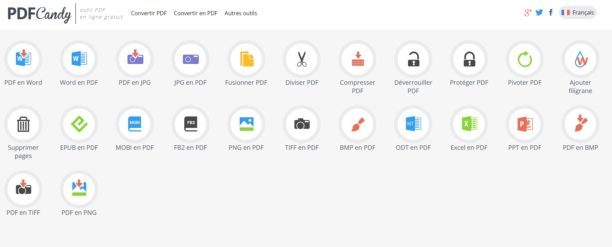
PDFCandy is another online tool that is handy and totally free. It includes Word / PDF conversions; PDF / WORD; PDF / JPG; JPG / PDF; EPUB / PDF; MOBI / PDF; PNG / PDF ... It also allows you to compress your files and lock or unlock them. A good tool complete and easy to handle.


Smallpdf


In the same vein, Smallpdf can compress, convert (PPT, JPG, Excel, Word), compress, merge or split, and sign PDFs. The free version size of the files, but is practical for basic uses.

Saturday, 21 June 2014

The best free easy way to download youtube videos

This is the best free easy way to download youtube videos without any programme or explorer add ,  just watch this video :

www.youtube.com/watch?v=AlST3HD-QNA

Sunday, 12 January 2014

How to design ads professional banners with HTML5

Design Studio HTML5 is the Web service directly to a new company Flite, is a competitor to the program Google web design and who dealt with him in a previous article , but what distinguishes the Design Studio HTML5 is that it is dedicated to designing advertising professional compatible with various devices ( phones , electronic boards , computers . .. ) depending on HTML5 technology , a smooth and reliable technique currently in the advertising industry , and with the dwindling use of Flash technology in the advertising industry on the Web , which had a negative impact on the major companies in this industry technical  , and when we talk about the flash ads are definitely not compatible with smart phones and electronic boards because of their side effects on these devices ...
Service does not require you to have any coding or the like , just log in to the service and then watched the video which will show you after registration service and proceed to design your ad with ease and that by the tools provided by ( included addresses URL, embed content from the major sites Kvaspock , YouTube , Twitter , include summaries Rss) which makes the ad professionally and is compatible with various devices , and you can engage in one of the available templates , the site also supports formats programs Adobe Photoshop and Adobe Illustrator.
After the completion of your design , you can preview it to see how it will look in smart phones and electronic boards , and you can at any time a service and the amendment to the ads without the need for re- coding your site and it automatically .
View video application to find out more about the service.

Monday, 28 October 2013

Converte your files with one click


Convert these files, for example, convert PDF format to other formats such as Word , JPEG , TXT ... etc.,
 Fortunately , there is a set of conversion programs , but despite finding the best can become boring at times.

Service dubbed Cometdocs allow you to host any kind of digital documents to the size of up to 1 GB to cloud hosting service , you can also convert these documents to multiple formats through the service offered by the company without installing any software and all you need is to create a special account on your site to enjoy all the benefits of the service and begin to store or transfer your documents .

Slowed this is not all on the subject , service is provide you with programs that run on Windows , Android and IOs which makes our company a significant competitor to major automakers conversion programs . And interestingly are the advantages of these programs the most wonderful , especially the custom program for Windows , recommend everyone try it , it makes converting documents something very smooth and beautiful , thanks to its integration with the right mouse menu (see photo above ) . Besides convert PDF to other formats many , it allows you to easily create PDF files from other files, and astonishing thing is that it supports Office Documents (Word, Excel PowerPoint), files, LibreOffice, files, AutoCAD (DWG, DXF), and image files ( JPEG, PNG, BMP, GIF, TIF).
All you have to do is sign up to the service and then right-click and choose your conversion as shown in the picture above .


The only drawback is noticeable on the service is not possible to intervene in the conversion process such as quality or size options .... etc.. But according to many users confirmed that the program is very smooth and attractive, either in terms of efficiency it is effective and converts files fast time, and you can view the latest transfers that you've made as in the picture below, the only drawback is that I mentioned above.
In terms of licensing and legal matters and applications of free software in each of the systems:
Windows XP, Windows Vista, Windows 7, Windows 8 and Android systems and IOs well.

To convert files without registration: here
For download from the company's system: Android or IOs 
For download from the company's site for Windows size 3 Mb: here


Friday, 25 October 2013

How to unlock PDF files in case you forget your password


Might happen to forget PDF file password, which does not make you can copy or print the content of the book, but after entering the password, in this topic I will help you to solve this problem very simply, of course, the way the accused PDF files that require you to enter password before watching the content, but only files that prevent you from copying content or print, where you require it enter the password.


The method is to login first to FreeMyPDF been lifted protected file, by clicking on choose my file was click again Do it after the process of lifting the file, download the new version of the book after the offset write protection, as well as printing the file, where 100% you will notice that it has become You can copy the contents of the file or print it as well. I hope that this trick will facilitate life for many students and staff, be sure to post entry with your friends.