Showing posts with label Applications. Show all posts
Tuesday, 6 March 2018
Friday, 9 February 2018
Late last year, Snapchat announced that it will launch a completely new design for its Android and IOS platform for better user experience.
The new version came to the users of the trial version, but Snapchat later offered to all users, unfortunately the new design did not grow for many users and perhaps this is annoying to the idea that is trying to regain the confidence of users.
But what new features has Snap added to its application, this question will be answered by reviewing the advantages within the following points: -
[post_ad]
Snapchat says this feature will show friends in the order that the user wants to talk to them. Of course, this feature depends entirely on the number of times you talk to your friends, so it will be more accurate than placing your favorite friends at the top of the list.
The new version came to the users of the trial version, but Snapchat later offered to all users, unfortunately the new design did not grow for many users and perhaps this is annoying to the idea that is trying to regain the confidence of users.
But what new features has Snap added to its application, this question will be answered by reviewing the advantages within the following points: -
- Launch the application with a completely different design than the old version.
- The possibility of seeing the most important stories for non-friends.
- The feature of non - disturbance in the application of Snap Chat and how it works:
- Click the message icon at the bottom right of the screen, or access the Friends section.
- Find and click the person or group chat you want to ignore.
- You'll see a list of different options.
- Select Settings and you'll see a new pop-up menu.
- Choose Do not disturb, so you will not receive a notification about new messages from this source anymore.
- You can reverse this option at any time by following the same steps and selecting Turn notifications on.
- New user lines can be used by following the following steps:
- Capture any image through Snap application.
- Click on the middle of the pictures or anywhere else you will see the writing box.
- After the appearance of the keyboard you will be presented with new and different styles of fonts. You can now choose the font style you want.
- As for the new design, all the "right, left and center" pages have been refreshed and structured. By scrolling to the right, you will be shown direct messages with friends and sorted by the last message, with the possibility of viewing their public stories. Based on the conversation time with them, there is the new Snapchat and the "best friends algorithm" feature.
[post_ad]
Snapchat says this feature will show friends in the order that the user wants to talk to them. Of course, this feature depends entirely on the number of times you talk to your friends, so it will be more accurate than placing your favorite friends at the top of the list.
Wednesday, 13 December 2017
The new application that allows you to earn many gifts by walking, running and dancing
The application of StepWin is the first of its kind in this field which stimulates walking and running continuously and is recommended by doctors
The application is available on the Play Store Store at the following link https://play.google.com/store/apps/details?id=app.stepwin
Thursday, 30 November 2017
The PDF format is a must exchange document. It is an essential format but can sometimes be complicated to manage if you do not have the right tools. To help you save time and control the management of your PDF files here is a selection of free and paid tools that adapt to all uses. These tools will be particularly useful if you want to create, modify, convert or compress your PDFs.
PDFelement 6
PDFelement 6 allows you to simply create a PDF file on which you can add text, images or links. It is possible to create a PDF from a Word, Excel or PowerPoint file by simply opening it and saving it as a PDF. You can also create "form" files: files that your contacts can fill. A very practical feature, and that is particularly useful.
Ilovepdf
ilovepdf.com is a free online service that lets you compress and convert your PDF files. Less complete than PDFelement, it has the advantage of being usable without downloading. It mainly offers conversion functions from PDF to PowerPoint, Excel, JPG and vice versa.
PDFCandy
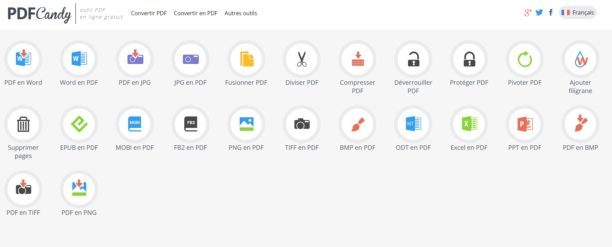
PDFCandy is another online tool that is handy and totally free. It includes Word / PDF conversions; PDF / WORD; PDF / JPG; JPG / PDF; EPUB / PDF; MOBI / PDF; PNG / PDF ... It also allows you to compress your files and lock or unlock them. A good tool complete and easy to handle.
Smallpdf
PDFelement 6

PDFelement 6 allows you to simply create a PDF file on which you can add text, images or links. It is possible to create a PDF from a Word, Excel or PowerPoint file by simply opening it and saving it as a PDF. You can also create "form" files: files that your contacts can fill. A very practical feature, and that is particularly useful.
Ilovepdf
PDFCandy
PDFCandy is another online tool that is handy and totally free. It includes Word / PDF conversions; PDF / WORD; PDF / JPG; JPG / PDF; EPUB / PDF; MOBI / PDF; PNG / PDF ... It also allows you to compress your files and lock or unlock them. A good tool complete and easy to handle.
Smallpdf
In the same vein, Smallpdf can compress, convert (PPT, JPG, Excel, Word), compress, merge or split, and sign PDFs. The free version size of the files, but is practical for basic uses.
Wednesday, 29 November 2017
The field of technology is an active and rapidly growing field, and there are many innovations and inventions that appear in this iPhone market that we often know about. An example of this is the "wondercube".
This small cube is multifunctional, since it will replace the charging cable, external battery, external memory card reader, flashlight and many other useful tools.
This magic cube will compensate you for 8 devices that you use unilaterally in an area of approximately 2.54 cm. This cube can work as a backup for your phone or any mobile device, so you can see the content of your phone at an excellent angle and comfort especially when you watch videos.
this cube provides you with a place to use external memory up to 128 GB, so you can increase your storage volume, and you can use it as a platform to back up your photos and data.
The unique feature of this cube is the possibility of charging your smartphone through a conventional 9 volt battery.
In addition, the device also provides you with a small compact lamp that has a rechargeable internal battery.

And the beauty is also a feature that I did not find in the rest of the applications is that it is fully compatible with the television and you can install it on the "Tv box." Of course this feature will be very useful to you if you are available on the "Mi Box" from Xiaomi, where you can control and move in the application of the control device of the device, you will not need to use the mouse as with the rest of the other applications.
You Can Download It From Here
Monday, 28 October 2013
Convert these files, for example, convert PDF format to other formats such as Word , JPEG , TXT ... etc.,
Fortunately , there is a set of conversion programs , but despite finding the best can become boring at times.
Service dubbed Cometdocs allow you to host any kind of digital documents to the size of up to 1 GB to cloud hosting service , you can also convert these documents to multiple formats through the service offered by the company without installing any software and all you need is to create a special account on your site to enjoy all the benefits of the service and begin to store or transfer your documents .
Slowed this is not all on the subject , service is provide you with programs that run on Windows , Android and IOs which makes our company a significant competitor to major automakers conversion programs . And interestingly are the advantages of these programs the most wonderful , especially the custom program for Windows , recommend everyone try it , it makes converting documents something very smooth and beautiful , thanks to its integration with the right mouse menu (see photo above ) . Besides convert PDF to other formats many , it allows you to easily create PDF files from other files, and astonishing thing is that it supports Office Documents (Word, Excel PowerPoint), files, LibreOffice, files, AutoCAD (DWG, DXF), and image files ( JPEG, PNG, BMP, GIF, TIF).
All you have to do is sign up to the service and then right-click and choose your conversion as shown in the picture above .
The only drawback is noticeable on the service is not possible to intervene in the conversion process such as quality or size options .... etc.. But according to many users confirmed that the program is very smooth and attractive, either in terms of efficiency it is effective and converts files fast time, and you can view the latest transfers that you've made as in the picture below, the only drawback is that I mentioned above.
In terms of licensing and legal matters and applications of free software in each of the systems:
Windows XP, Windows Vista, Windows 7, Windows 8 and Android systems and IOs well.
To convert files without registration: here
For download from the company's site for Windows size 3 Mb: here